
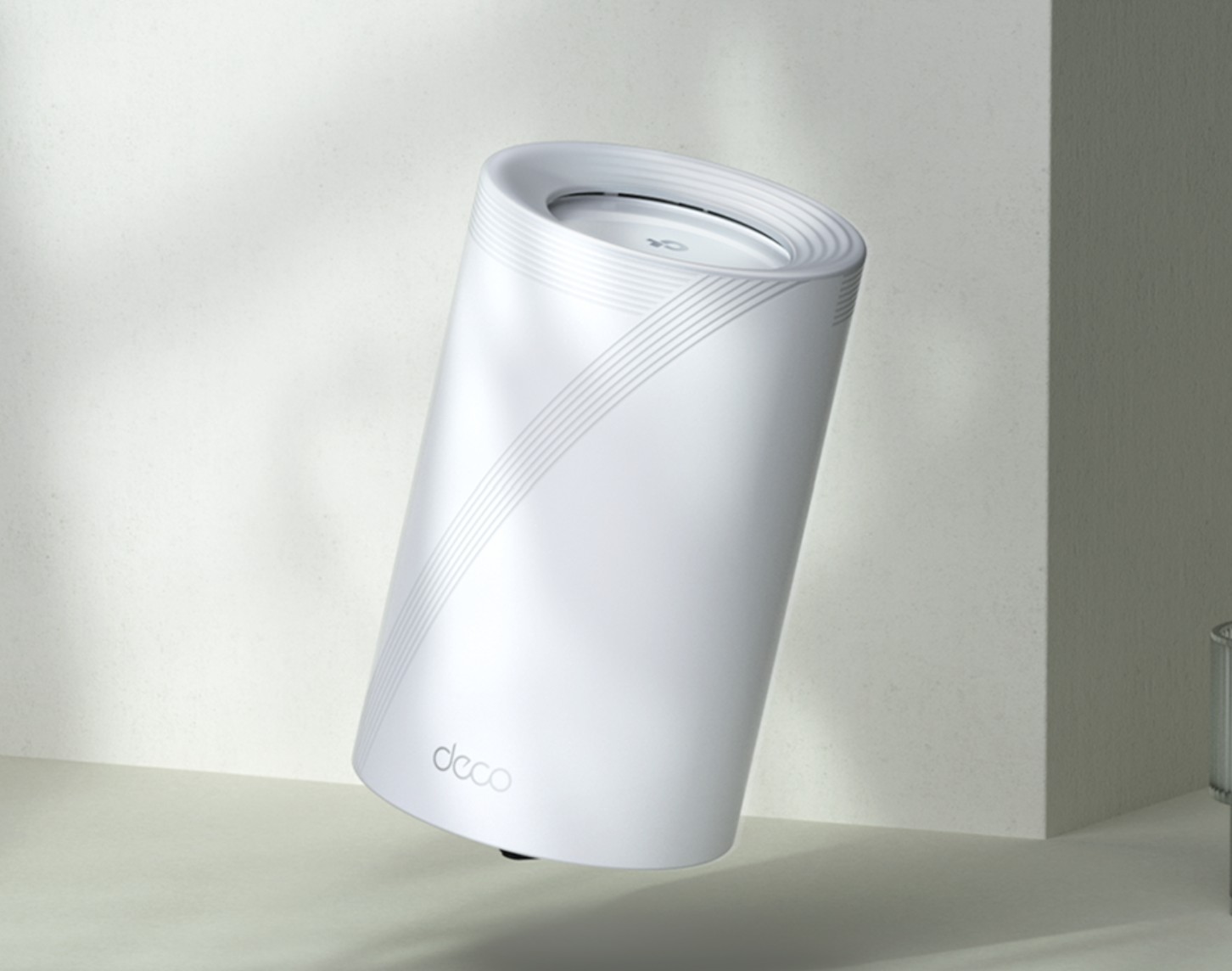
The TP-Link Deco BE65, Tri-band BE11000, 6-stream mesh router has been Australia’s top-selling router since NBN graciously made 500/50Mbps the base speed for FTTP users.
It is very well priced and comes in 1, 2 and 3-packs, which will cover most larger homes. While Ethernet backhaul between the router and satellites is always recommended, this is pretty good with Wi-Fi backhaul. It uses the Qualcomm Network Pro 620 platform, featuring a Quad-Core 2.2GHz ARM-A73 chip, which offers significant benefits over other brands of Wi-Fi 7 chips.
- 10 Gbps peak capacity (BE11000)
- 320 MHz 6GHz channels
- MLO (Multi-link Operation) combines spare capacity in 2.4, 5 and 6 GHz channels for low-latency backhaul.
- 4K QAM.
- MU-MIMO.
- OFDMA.
- Adaptive Interference Puncturing
- Multi-RUs.
- 6-stream.
- 4 x 2.5Gbps WAN/LAN ports.
- USB-A 3.0 port.
- Concurrent IPV4 and IPV6.
- The Deco app is straightforward but has advanced features for enthusiasts.
- BE11000 is 688Mbps (2.4 GHz), 4324 Mbps (5 GHz) and 5765 Mbps (6GHz).
Why is Wi-Fi 7 so much faster?
Wi-Fi 7 mesh routers are backward compatible with earlier Wi-Fi versions, so if you’re buying a new router, definitely consider Wi-Fi 7. However, the full benefits of Wi-Fi 7 only become available with fully Wi-Fi 7-compatible tri-band routers (at least BE11000) and Wi-Fi 7 devices.
With Wi-Fi 6 and 6E routers, you won’t get the faster 4K QAM, MLO, increased bandwidth, higher transmit power, improved reliability, speed, reduced lag, and the latest security and technology. In summary, when properly implemented, Wi-Fi 7 can greatly enhance existing home networks.
Wi-Fi 7 devices like the Google Pixel 10 Pro, Samsung Galaxy 25 Ultra or the fabulous OPPO FindX9 Pro are here, and more and more laptops are available. By the end of 2025, most premium smartphones (Qualcomm SD8 Gen 3/Elite or later) and computers (with an Intel BE200/202 adapter or Qualcomm Copilot PC) will support it.
Consumer Advice: Don’t buy grey market – it likely won’t work here
Because Australia only has 500 MHz of the 1200 MHz 6 GHz Wi-Fi 7 band (42% and one 320 MHz band instead of three), routers sold here have different firmware and transmission strengths differ. You can quickly tell if the router/satellites are certified, as they will have an R-NZ C-Tick on the external box and the sticker under it.
TP-Link will be updating the Australian firmware to accommodate the new ACMA to free up more 6 GHz band for Wi-Fi – 2 x 6 GHz x 320 MHz bands.
Why Mesh over a router?
Basically, a Wi-Fi 7 router is like a single car engine – 2.4/5/6 GHz transmits within a 20/10/6-metre radius circle around it. It is ideal for smaller apartments, and gamers love them too, as game resources can be prioritised.
Mesh routers are like placing an engine on all four wheels – distributed power. Each mesh node can cover about 300m2 per satellite with Wi-Fi. Mesh works best with an Ethernet cable between each node (wired backhaul) or can use Wi-Fi backhaul (not as much Wi-Fi bandwidth available for users).
The BE65 is a little different from most meshes. First, each ‘satellite’ is as strong as the primary router, and second, if you use cabled backhaul, you get the total Wi-Fi bandwidth (many mesh don’t free up the Wi-Fi backhaul when not used).
The BE65 is the entry-level BE11000 mesh. There are currently three more powerful mesh routers that you may use for larger homes or more devices.
- Deco BE68 Tri-band BE14000, 8-stream https://www.tp-link.com/au/home-networking/deco/deco-be68/
- Deco BE77 Tri-band BE17000, 9-stream https://www.tp-link.com/au/home-networking/deco/deco-be77/
- Deco BE85 Triband BE22000, 12-stream is probably overkill. https://www.tp-link.com/au/home-networking/deco/deco-be85/
More advice
NBN FTTP and HFC users don’t need a crappy NBN modem/router. In fact, most of the reliability issues are with old Telstra Wi-Fi 6 or earlier Smart Modems or those from Optus and Vodafone.
The Deco plugs directly into the UNI-D1 port on the NBN box. If you have a landline, you can keep the old modem./router and plug into the Deco.
- Crappy NBN Modem – here are a few better ones
- Crappy NBN modems – the lessons we learned from our free advice
- Free NBN Router advice is back by incredibly popular demand
Australian Review: TP-Link Deco BE65 Wi-Fi 7 BE11000 tri-band mesh router as at 9/12/25
Note 1: This is not the Deco BE65 Pro. While the routers are essentially the same, the Pro has 1 x 5Gbps and 2 x 2.5Gbps WAN/LAN ports (total 3) versus the BE65 with 4 x 2.5Gbps WAN/LAN ports.
Note 2: There is a very interesting Deco BE65-5G Tri-band BE9300 that can use 4/5G mobile data, and NBN fall over, as well as FTTP/HFC.
| Website | AU Website Product User Guide |
| RRP | TP-Link does not advertise RRP, so prices are estimates. Shop around, but buy an Australian certified product. 1-Pack $400 2-Pack $700 3-Pack $800 |
| From | Harvey Norman, Joyce Mayne, Bing Lee, Officeworks, Good Guys, and specialist computer stores, including MWave, Scorptec, and Umart. Also, via the TP-Link Amazon store. |
| Warranty | 3-year ACL if purchased from authorised resellers. |
| Made in | Now Vietnam |
| Company | It is a top player in the Australian and the US home router/mesh market, with an estimated 65-70% market share. TP-Link Systems Inc. has its headquarters in the US and is a standalone entity in shareholdings. Operational aspects, such as workforce, critical research and development, production, marketing, customer service and support, are shared with the US and other regional countries for capacity planning and quality control. |
| More | CyberShack TP-Link news and reviews |
Ratings
We use the following ratings for many of the items below. CyberShack regards a score between 70 and 80/100 as a fit-for-purpose pass mark. You can click on most images to enlarge them.
- Exceed (surpasses expectations or is the class leader).
- Fail (below expectations), and we will let you know if this affects its use.
- Pass(able) rating that is not as good as it should be.
- Pass (meets expectations).
- Pass ‘+’ rating to show it is good, but does not quite make it to Exceed
First Impression – Elegant, subtle Wi-Fi 7 stylish highlights
The BE65 shares the same design cues as the BE68, BE77 and BE85 – 107.5 circular × 176 mm high, subtle 7 design, a single LED to show status and rear ports.
It’s fine to put these on show, as that is where Wi-Fi works best – not buried in a cupboard or hidden on top of the fridge.
I like tech, so let me elaborate
- Qualcomm Networking Pro 620 Platform (a real strength)
- 1GB RAM (by comparison, the BE85 BE22000 has 2GB)
- 10Gbps LAN/WAN (4 x 2.5Gbps)
- 688Mbps (2.4 GHz), 4324Mbps (5GHz) and 5765Mbps (6GHz)
- Four antennas placed for 360° coverage (one each for 2.4, 5 and 6GHz, plus one for router/BT use)
- 6 independent streams (3 bands by 2)
- AI to continually optimise and streamline the data path from the router to the satellite and vice versa.
- If using Ethernet backhaul, the Wi-Fi backhaul is available to Wi-Fi clients.
It may be the essential mesh router, but these specs are way ahead of the price. I guess that is the advantage of being Australia’s top-selling router brand.
Setup: The Deco app makes it so easy
Download the Deco app for iOS and Android. It does require an account, and that has the usual Privacy implications. From our reading, they are relatively benign and user data is stored in a local cloud. BTW – TP-Link Australia is a wholly owned subsidiary of TP-Link USA. There is no cross-ownership by the original Chinese TP-Link. Its models are designed and certified for Australia.
We won’t go through a simple setup as the app guides you. Plug the router into power and connect it to the Internet gateway. Once it’s set up, plug in power to the satellites, and they will join the Mesh. You can also use Ethernet backhaul.
Hint: Use your existing SSID and passwords
If you are replacing a /modem/router/mesh, use the same SSID name and password as the old one (turn it off first), and everything will reconnect – at worst, you may need to power-cycle the clients.
For example, if your old modem/router has a single SSID like XXXX, use that. If it has XXXX and XXXX_5G, also use that.
The Deco BE65 has three bands delivering full-duplex (same speed) both ways.
- 2.4GHz, 688Mbps, 20/40MHz – effective transmission distance is up to 30m or a 700m2 circle (up to 100m line-of-sight). Mainly used for IoT devices and with a 150-600Mbps connection speed.
- 5GHz, 4324Mbps, 20/40/160/240MHz – effective transmission distance is about 10m or a 300m2 circle. Mainly used by Wi-Fi 5 and 6 devices like computers, TVs, etc., that connect at 866/1730.2401 Mbps. The 240MHz aggregation is not available in Australia.
- 6GHz, 5765Mbps, 20/40/160/320MHz – effective transmission distance is 6m or a 150m2 circle. It can connect at up to 5765 Mbps.
These distances are approximate and depend on the environment. For example, the signal strength is effectively halved each time the signals pass through walls, floors, cupboards, or windows. In any case, a 3-pack will effectively cover an area of about 30 x 30m, which is 900m².
Double NAT (network address translation): Router or Access Point?
If you have HFC or FTTP, you plug this directly into the NBN NTD UNI-D1 RJ45 Ethernet socket. The primary Deco is the router, and you don’t need your old modem/router gateway unless you have a landline. If you do, plug the old modem/router into the BE65 LAN socket.
FTTP/HFC UNI-D1 > Cat 6 Ethernet cable > BE65 WAN port
Do not plug the BE65 into the old modem/router LAN, as few have the CPU power and RAM to handle the 500/50 Mbps, let alone route to and from the internet.
You may have read that you should set the primary Deco up as an Access Point to avoid Double NAT – don’t. Deco loses its NAT, DHCP server, Parental Controls, QoS, Device Isolation, and Connection Alerts if you do.
A Double NAT is fine as long as the Deco is the primary router and the other has a different LAN IP address, and preferably, disable its Wi-Fi.
Ports – Pass+
It has 4 x 2.5Gbps ports. The one connected to the Internet becomes the WAN, and the rest are LAN ports. Use Cat6 Ethernet cables if possible.
It has one USB-A 3.0 5Gbps full-duplex port. The maximum speeds will depend on the attached flash drive or external SSD. You can expect up to 150/150MBps sequential read/write on an SSD.

Backhaul – Pass+
Backhaul is how the router and satellites communicate. The faster the backhaul, the more data it can move and the more devices it can handle.
The Deco BE65 can use:
- Ethernet backhaul up to 2.5Gbps
- Wi-Fi backhaul. Don’t forget that this has a much shorter 7-10m range.
- Ethernet and Wi-Fi 6GHz. There is confusion that this aggregation uses 2.4/5/6Ghz MLO, but if the MLO channel is enabled for general use (and it should be), only 6GHz is used. Ditto to clients.

And that brings up the main issue of mesh.
The primary router transmits a signal – both front haul to, and backhaul from the satellite. The satellite happily retransmits what it receives – it cannot amplify it. So, while you may get terrific device-to-satellite ‘speeds’, the actual throughput to the router could be less.
Speed and coverage tests – Pass+
There are many ways to measure router/satellite speeds.
- The ‘apparent’ Rx/Tx speed between the Wi-Fi device and the router or satellite. That is a poor measurement, as you know that each transmits the same speeds and has the same band distances.
- Internet access download/upload/ping speeds. FTTP and HFC users now have 500/50, so you will get whatever the router/gateway is connected to.
- Speeds are affected by loads. Our test includes 2 x 4K streams from Netflix or Prime Video (no impact), whole of home Sonos (10 speakers), all belting out at decent volumes (no impact). Download and upload a 20GB file to Dropbox (no impact)
- Coverage – how much area can the three (or two or one) pack cover? The antenna design radiates in a 360° circle at about a 90° angle, covering a typical home’s floor-to-ceiling. Don’t use too many satellites, as the overlap can interfere with auto-roaming. Eachs router/satellite covers 6GHz/150m2 (12 x 12m), 5Hz/ 300m2 (17 x 17m) to 2.4GHz/ 700m2 (26 x 26m).
- Auto-roaming – Pass+
Tests with OPPO Find X9 Pro and 500/50Mbos NBN, 6GHz band
| Signal strength | Rx/Tx | NBN (Mbps) | |
| 2m from router | -41 | 5010/4970 | 562/47 |
| 5m from router | -54 | 4803/4003 | 553/48 |
| 10m from router | -57 | 4163/3106 | 5556/46 |
The tests with Ethernet backhaul between the router and satellite were almost identical.
Satellite Wi-Fi backhaul 7m from the router through two walls and two built-in cupboards, so expect about a 50% drop-off in speed.
| 2m from satellite | -48 | 2882/2882 | 557/48 |
| 5m from satellite | -52 | 2882/2738 | 550/48 |
| 10m from satellite through an external wall | -77 | 2305/1393 | 341/38 |
What do the figures mean?
This test shows that the BE65 can easily deliver 500/50Mbps NBN (or higher) using a Wi-Fi backhaul from the router to the satellite.
This is impressive, only slightly beaten by the more powerful BE68, BE77 and BE85, which would have a 10-20% Rx/Tx speed advantage.
Heat/Noise: Pass+
It is silent as it is fanless, and external heat is generally below 30°.
Power: Pass
Each router and satellite can consume up to 12V/2.5A/30W per hour under load. Typically, they sat at 15-20W – minimal.
Parental control and KidShield – not tested
Parents can set app blocking, web filtering, YouTube restrictions, SafeSearch, and online time limits to keep kids safe while having fun online.
KidShield protects children away from home, even if they are not connected to your home Wi-Fi.
Some advanced features require a subscription.
Network protection – not tested
HomeShield 3.0 examines your network by scanning and identifying potential risks, stopping them before they harm your network. Some features require a subscription.
CyberShack’s view: TP-Link Deco BE65 is the ‘Toyota Camry’ of Australian routers
It is reliable, can carry a load, and will work for years. Of course, you can get more powerful models, but that is largely unnecessary unless you have lots of IoT devices and Wi-Fi security cameras.
Most mesh systems have a dedicated router and different satellites with reduced functionality, like fewer Ethernet ports, less bandwidth, etc. Not so with the BE65 – all three are fully functional routers acting as one powerful mesh.
Then you have those three extra Ethernet LAN ports on each – perfect for connecting a TV, set-top box, Blu-ray, network-attached storage or a PC/Mac.
But what impressed me most was that it handled 500/50Mbps very well. Load times on streaming services were seconds quicker; digital TV channels came up as fast as Free-to-Air, and lag was gone.

TP-Link Deco BE65 ratings
It may be the essential, entry-level tri-band router, but it shares the TP-Link Deco BE heritage.
It is the best mesh both in performance and value currently available. Its only real competitor is the Netgear Orbi 770, which costs $1499 for a 3-pack – about $600 more for not as fully featured mesh.
- Features: 85. All you need and then some with the easiest install from the Deco app.
- Value: 90. Less than $800 for a 3-pack
- Performance: 85. Heaps of speed and coverage, and perfect for up to 2.5Gbps NBN
- Ease of Use: 90. Straightforward app and install.
- Design: 90 – Attractive design.
Would I buy the TP-Link Deco BE65?
Yes, I would, but I already have the BE85, tri-band, BE22000 router. It’s total overkill for most homes, but I need to test the best.
However, those with lots of IoT should consider the BE68 or BE77 as well.
Pro
Straightforward setup using the Deco App.
Four 2.5GBps ports for 2.5Gbps Ethernet backhaul
Wi-Fi 7 support, backward compatible with existing clients.
Excellent overall real-world performance, even compared to Wi-Fi 6E
Ethernet backup gives 100% Wi-Fi bandwidth and availability
Con
HomeShield Pro costs extra
AFC and some Wi-Fi 7 features are not yet available in Australia (not TP-Link’s fault)
CyberShack Verdict
TP-Link Deco BE65, Tri-band BE11000, 6-stream mesh router
Approx 1-Pack $400, 2-Pack $700, 3-Pack $800










Comments