

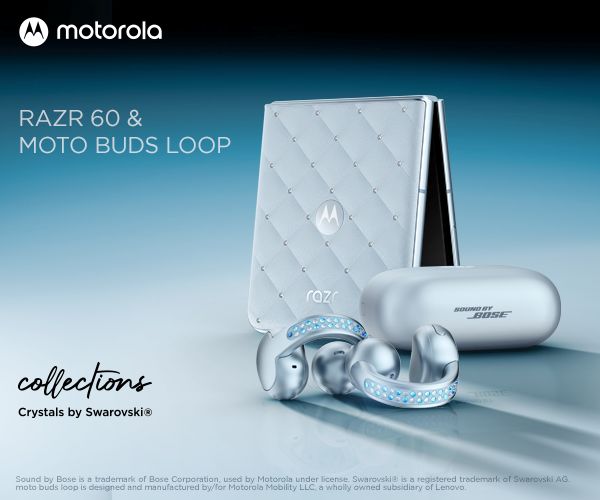
The Motorola Razr 60 Swarovski Edition is a prime example of technology as fashion. With 35 Swarovski crystals encrusting the device, the curated Pantone colour and the quilted leatherette design on the clamshell, this phone is as attractive as they come.
It even comes with a case that has strap attachment points so you can wear it around your body like an evening bag.
As a foldable phone, the Razr 60 provides a form factor that becomes half the size when not in use. The external display shows you notifications and apps at a glance, making it a great option for quick check-ins.
This is a luxury version of the regular Razr 60 – a great phone in its own right. However, the Swarovski model will run you a few hundred dollars more, and for that you’re getting a whole lot more style – but without any more substance.
Rating
Overall: 4 / 5
Pros
- Uniquely stylish
- Highly pocketable
- Good cameras
Cons
- Quite a bit more expensive than the standard version
- Performance falls a bit short of expectations
- Limited software support tail for the price
$1499 | For anyone seeking a bit more fashion in their tech
Setup & First Impressions
Right from opening the box, you’re treated to a premium experience. Inside you’ll find the phone next to a bespoke case presented like a jewellery piece. Underneath, you’ll find the case strap, a charging cable and documentation.
It’s an incredibly stylish, well-fitted device that people can’t help but ask about. I’ve received more questions and comments whilst carrying this phone around than any other phone I’ve had recently.
The Motorola Razr 60 Swarovski is easy to set up with guided steps throughout the process. If you’re migrating from an old device, you’ll have the option to move your apps and data across so you can pick up right where you left off.
There is a custom overlay on the Android launcher that shapes the app icons like jewels to match with the rest of the Swarovski crystal aesthetic – it’s very extra and I’m here for it. You can personalise these settings to your heart’s content in the Motorola app.

Design & Aesthetics
The Razr 60 Swarovski Edition has 35 crystals embedded in its exterior finish and metallic flake in the leatherette-feel clamshell, making it look quite premium. While the regular Razr 60 comes in a range of colours, the Swarovski version is only available in the pale blue Ice Melt Pantone colour.
It’s likely to be a divisive finish – Swarovski crystals and baby blue aren’t to everyone’s taste – but it’s certainly a striking aesthetic and I absolutely love that Motorola is willing to experiment like this.
The external display is a 3.6-inch unit while the internal display is 6.9-inches with a tall 22:9 aspect ratio. That makes it a little taller than typical phones, so it takes a little adjusting to. If you have small hands like many folks this phone is targeted towards, it will be a big stretch to reach the top of the screen.
The seam on the internal screen is definitely noticeable, but it’s not a dealbreaker. In normal usage at regular angles it’s easily ignored, but any reflections or off-angle viewing shows the flexible area.
Life with the Motorola Razr 60 Swarovski
I’ve been using the Motorola Razr 60 Swarovski for two weeks snapping photos, gaming, and browsing. It’s a tried and tested form factor that I’ve grown to love returning to.
Positives
Showing the Razr 60 Swarovski to friends and family has been a delight. They love to ask questions about it and discuss the stylish crystal finish or the external display cameras.
The cameras are fairly impressive, producing sharp, vivid images. With default camera settings, they honestly look a bit more saturated than real life, but the camera is more than capable for typical snapshots and social media photography.
The folding form factor gives you some unique opportunities regarding camera usage. For example, the Razr 60 supports a “camcorder mode” where you partially unfold the phone and hold it horizontally for easy videography.
Another key benefit is using the external display as a camera preview, giving you the full rear camera resolution for taking selfies or giving your subject a preview of their photo. It even has a mirror mode that gives you access to the main lens for checking how you look.
We’ll touch on the cameras in depth later in the review.
The Moto app makes it easy to customise your phone’s background, icons, fonts, and gesture controls. It’s a one-stop app to make your phone uniquely yours instead of searching through settings menus to customise.
The hinge holds the phone open or shut securely, and I found it easy enough to open with one hand.
Negatives
With default settings, the Razr 60 loves to annoy you with notifications about its features. It took a few days of swiping away annoyances before the phone decided it had told me enough about how a phone works.
The inbuilt speakers are fairly clear for dialogue and voice calls, but lack bass response. You’re definitely going to want headphones or a Bluetooth speaker for any extended listening because for music, the inbuilt options are pretty bad.
In terms of performance the Razr 60 keeps up with day-to-day tasks, but it starts to struggle a bit with demanding apps. There is some noticeable delay whilst switching between certain apps, and demanding games fall a bit short of expectations.
Some default gestures presented problems in my typical usage. By default you can open the cameras while the phone is shut by twisting the phone twice – and when putting the phone away into my bag it would frequently open the cameras without me intending to.
Noteworthy
The battery life has fairly comfortably lasted a day, but the standby time is not particularly impressive. You’ll definitely want to charge the Razr 60 at least once a day to keep it topped up. I found conflicting reports from users, as the battery is fairly large for a foldable of this form factor but in real-world usage it didn’t seem to last very long for me at all.
At first I thought the external display would be fairly limited, but the Razr 60 will let you open any app you have installed. Not every app is designed to work on the squareish aspect ratio, but it’s been fun to try.

Performance & Reliability
The Motorola Razr 60 Swarovski uses the Mediatek Dimensity 7400X processor with 8GB of RAM – and there are significantly better performers for the money if your main concern is processing power.
It’s only an incremental upgrade over the Razr 50 chipset and for many users it will be good enough, but it might be worth double checking if you play a lot of 3D games or use performance-hogging apps.
As far as reliability goes, there doesn’t seem to be any glaring issues with the Razr 60. The hinge feels robust and Motorola has tested the new titanium-reinforced design to 500,000 folds. It’s backed up by a 1-year standard warranty.
Camera
The cameras on the Razr 60 provide a great shooting experience. The device features a 50-megapixel stabilised main sensor, a 12-megapixel ultra-wide lens, and a 32-megapixel selfie camera on the main screen.
In daytime shooting the cameras performed very well, snapping impressive photos. By default the cameras shoot in HDR format, making them look a little more saturated and sharper than real life when reviewing photos on the phone itself.
There doesn’t seem to be an option to turn off HDR photography unless you shoot in Pro mode all the time – and I imagine there’s not many people who would put up with this workflow for phone photography.
Once you pull your images out of the photos app and view them on another platform, device, or app, the colours will look different, so it can be a bit of a pain to check your shots before posting.
In tricky lighting conditions like low light or mixed scenes, the cameras seemed to struggle a bit with exposure and details become quite blurry, but overall I was impressed with the camera performance.


Practical Considerations
Motorola’s flavour of Android is fairly true to stock settings, and I found it easy to use. There are a few extra apps and settings in the overlay, but for the most part they are helpful and useful.
Motorola promises three years of operating system upgrades and four years of security updates where most another brands are extending the support tail up to twice that time. This is definitely a point where I would like to see Motorola do better as historically the company hasn’t had the greatest track record in this area.
The Razr 60 Swarovski will receive Android updates through the end of 2028 and security updates through 2029, but in a world where people are keeping their phones for a longer period of time, this is definitely a downside.

Value & Alternatives
In terms of value, the Razr 60 Swarovski edition isn’t a purchase you’d make logically. You’d buy it because you love the luxury design and because you care about fashion over function, and that’s totally valid.
However, when looking at alternatives on the market it doesn’t present as great a value proposition. At the time of writing, the Galaxy Z Flip7 FE is about the same price, and even the standard Razr 60 is several hundred dollars cheaper.
That said, if you’re looking for a phone that you can fashionably wear like an evening bag, I think this is pretty much your only option.
Would I buy it with my own money?
Realistically, no, because you can get the same functionality out of more affordable alternatives. However, in terms of technology as fashion, the Motorola Razr 60 Swarovski is just about unbeaten – so if that’s your priority I say more power to you.






Comments