
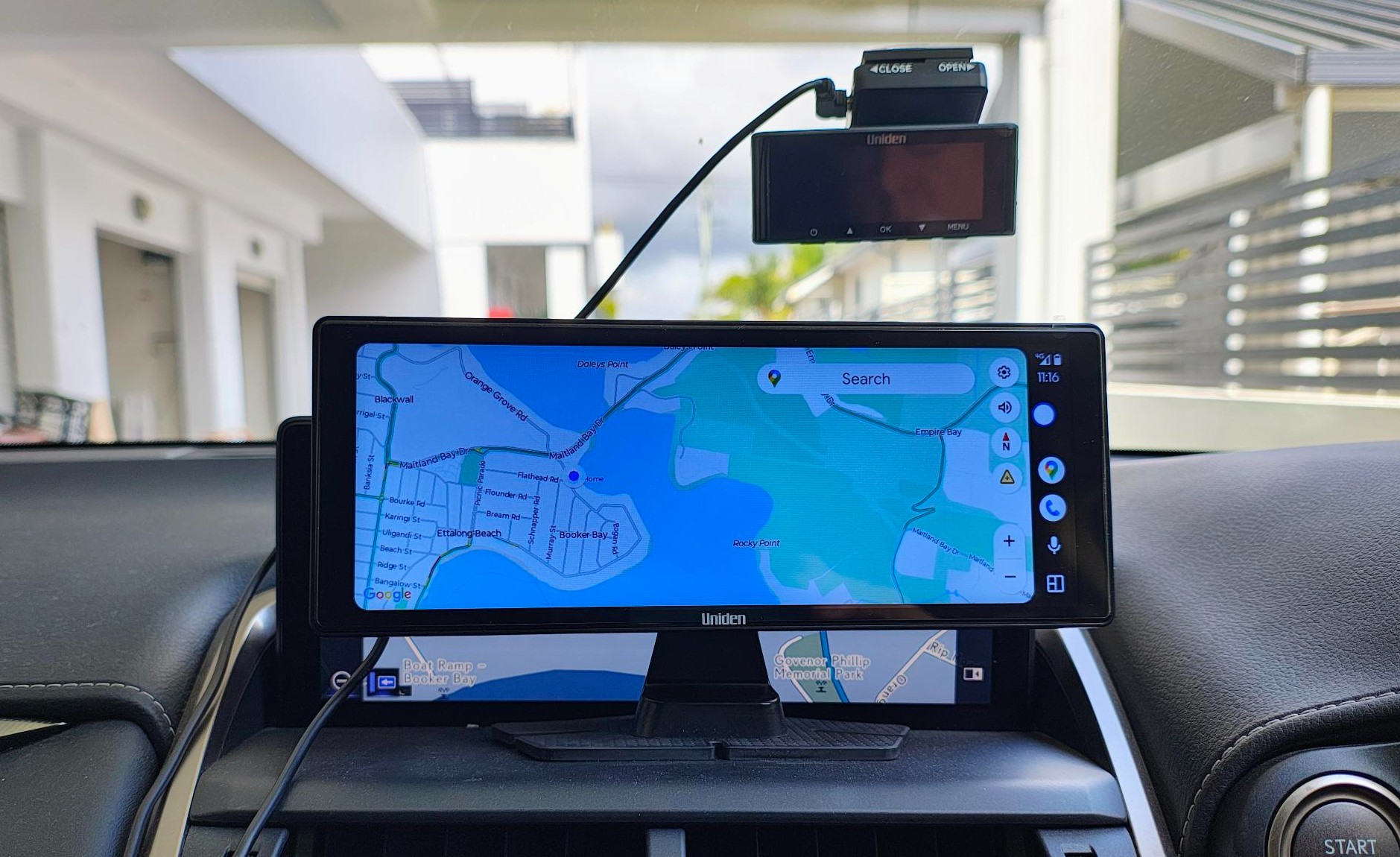
The Uniden iGO Play 10+ adds Android Auto and Apple CarPlay via a 10.26” dash mount colour screen and power from the car’s utility socket. Perfect for older cars.
Now, let’s be clear that it is purely a screen that connects via Bluetooth to an Android or an iPhone and uses the phone’s app, mobile data, maps, GPS and other features. No phone – no car interface. It also does not connect in any way to the car’s computer management system.
CyberShack is an Android site – we don’t have the bandwidth for both Android (70% global market share) and Apple iOS (30%), so we assume that Android Auto and CarPlay do very similar things.
Although the Uniden iGO Play 10+ has a few extras. For example, it can
- Attach to a Uiniden reversing camera (camera appears not to be sold separately)
- Use Google or Siri voice commands (own far field mic)
- Support Apple, Google, Waze or other mapping apps
- Supports podcasts or audiobooks via Spotify and Apple Music through the screen.
- Supports traffic updates (if the map app does)
- Has stereo speakers and EQ or can broadcast over FM or use a 3.5mm AUX cable.
- Has a 10.26” touch panel/. The unit is 240 (w) x 95(D) mm
- Can mirror Apple or Android screens
- Has a micro-SD card slot
- Has an adhesive dash mount 140 (W) x 65 (D) mm that you must use for legal reasons
Australian review: Uniden iGO Play 10+
As of 12/01/26. This is not the iGO Play 10. There is the only proper deep-dive review (not just regurgitated press releases) on the internet, so read on.
| Website | Multimedia Screen range Product page Manual |
| RRP | RRP$249.95 but seen for $224.95, so shop around |
| From | Uniden Online, JB Hi-Fi, Bing Lee, Big W. Do not buy from online marketplaces like Kogan/Dick Smith/Matt Blatt/Mighty Ape, etc. |
| Warranty | 1 year |
| Made in | China |
| About | Uniden is a Japanese electronics company established in 1966. In Australia, it is solid in surveillance cameras, CB radio, household cordless phones, etc. |
| More | Cybershack Uniden news and reviews |
Ratings
We use the following ratings for many of the items below. CyberShack regards a score between 70 and 80/100 as a fit-for-purpose pass mark. You can click on most images to enlarge them.
- Fail (below expectations), and we will let you know if this affects its use.
- Pass(able) rating that is not as good as it should be.
- Pass (meets expectations).
- Pass ‘+’ rating to show it is good, but does not quite make it to Exceed
- Exceed (surpasses expectations or is the class leader).
First Impression – pretty big. You will need the dash space
It is 140 (H) x 240 (W) x 70 (D) with the mount, so check that you have a central flat dash space. It uses 12V/.66A/8W from your car’s utility (cigarette lighter) socket or USB 3.0 5V/3A/15W if you don’t have a utility socket. If using USB-C, make sure that your socket is a USB 3.0 15W-capable.
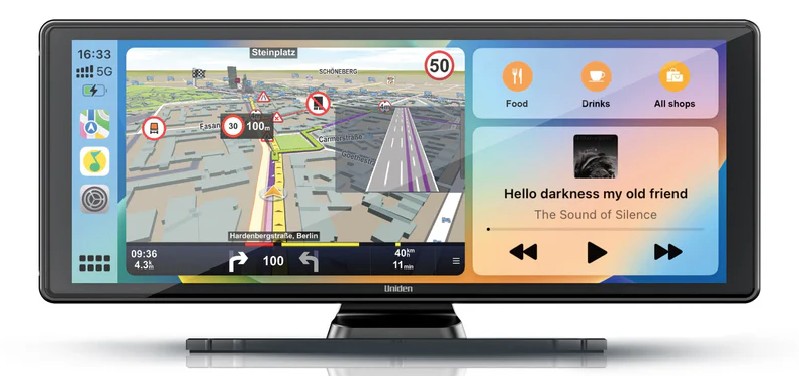
When it first boots, it shows a darkish blue Home screen (its basic intelligence). The icon-driven touch menu shows:
- CarPlay
- Android Auto
- PhoneLink
- Audio Output (BT, FM Transmit, 3.4mm AUX, local speakers
- BT Music
And swipe left for
- SD card
- Rear Camera
- Setup

Setup has EQ settings, display settings, basic setup, background, factory set, time setting, language and version. Many of these are also controlled by the phone. Out of the box settings are fine.
Set up (Android Auto, but iPhone is a similar concept)
Any Android 9.0 or later supports Android Auto. Any Google Play update will update it, but please check. Go to Google Play, press on your image (top right), Manage Apps and Device, and press All apps up to date.
Next, enable Bluetooth and search for Carkit-XXXX and join. Remember to give it all the permissions it asks for, including your contacts (for the phone function).
Android Auto does not appear as an app icon on your phone; instead, you need to search for it (search bar) in Settings. The main setting screen is below. The settings are what we used for testing.
Now press the Uniden’s Android Auto icon, and up will come Maps (2/3 of the screen usually on the right side as we drive on the right) and a media player (1/3 of the screen left side). You can have a full screen by pressing the Google Maps icon.

Settings (Google Maps screen)
There is a drop-down box
- Mute or change sound level
- Traffic: On (uses the Live Traffic, Google Maps, and Waze for real-time incident reporting and alerts across different states and territories.
- Satellite view: Off
- 3D Buildings: Off
- Alerts: On
- Route Options: Avoid freeways, toll roads, ferries, and prefer fuel-efficient routes. This can be a real problem, so leave all unchecked (or turn off ferries).
- There is a volume (floating white circle) that allows volume set from 0-30, power off and home.
Screen Mirror versus using the Uniden Android Auto interpretation
It uses the phone’s wallpaper and whatever apps you have selected in its Android Auto settings. There is a settings cog that you can experiment with, and a new EV setting.
Screen: Pass
It is a 1600 x 600, IPS touch screen with reasonable off-angle viewing. Some low-cost polarised sunglasses may have a rainbow effect. The screen has a reduced glare coating.
Bluetooth/Wi-Fi: Yes/No
It is advertised as ‘Bluetooth & WiFi – The wireless connection allows users to stay connected through the device every time they’re in the car’.
We have thoroughly searched the settings, and there is no Wi-Fi on this unit. The phone must join via BT and have an internet connection via mobile data or Wi-Fi.
Tunnels and blackspots: Probably not
It uses your phone, and this may have emulated tunnel reception (our Android test did not). It does not have a dedicated, independent GPS with advanced features like ‘dead reckoning’ for predicting tunnel positions.
It’s also useless where you cannot get a mobile data or internet signal. You can download Google Maps to your phone, and it will use the phone’s GPS for route guidance, but it lacks the added features when offline, like searching for local cafes, etc.
The same goes for music streaming – unless you have downloaded the playlist to your phone, you won’t get music.
To be fair, any Android Auto or Apple CarPlay device will be the same.
Speakers: Passable
The internal stereo speakers are basic. Its EQ looks great with 30 Hz to 8 kHz +/-5dB settings and presets for jazz, classic, pop, rock, user, and reset. Simply put, the speakers are not capable of music fidelity.
FM tuning is better, allowing you to select an empty frequency from 87.5 to 108 MHz and play via your car’s sound system. I noted a slight frequency clipping.
A 3.5mm to 3.5mm AUX cable takes the Analogue sound output to the sound system (if it has a 3.5mm input), and the sound is clearer and cleaner.
You can also use Orinal BT for your phone’s speakers – definitely not recommended.
Voice Control: Pass
If your phone is compatible with the car, it may use the steering wheel voice/volume controls. If not, it listens for OK Google and responds to voice commands for navigation.
Rear camera: Good if you can get one
We cannot find it available for sale. It has a 2.5mm (not standard 3.5mm) AV port. Most Uniden rear cameras use USB connections.
CyberShack’s view: Uniden iGO Play 10+ offers 10.26” of space
If you have been relying on your phone’s Google or Apple navigation, there is a very high chance that you may be fined. Such devices must be appropriately mounted and not used for any purpose other than GPS.
The Uniden iGO Play 10+, when in its cradle, is classed as a navigation and voice-enabled (hands-free) device – totally legal. Your phone remains out of sight.
Having reviewed several of these units since Android 9, we can say that they all do Android Auto or Apple CarPlay pretty well because they are basically a dumb screen.
The Uniden adds some extra features like a wider screen and a few more controls and features, which justify its $249.95 price.
Uniden iGO Play 10+ rating
It is rated as a widescreen DIY Android Auto/Apple CarPlay. It’s not really intended for new cars unless they don’t have this facility.
- Features: 85. It has all the expected Android Auto/Apple AirPlay features and is kept up to date via the smartphone.
- Value: 80. A tad more expensive, but it seems good value for a wide screen.
- Performance: 80. It is fit for purpose; sometimes, the touch screen is a little laggy, but it always does what it should.
- Ease of Use: This is fine if you know how to use Android or iOS. Remember that it is just a screen for your phone.
- Design: A 10.26” is better for map display.
CyberShack Verdict
Uniden iGO Play 10+: 10.26” DIY Android Auto or CarpPlay
$249.95 but shop around










Comments